Week #797
We started the week off with a few meetings. All our surveys are done, so the team had a meeting to plan some summer projects and what needs improving for next school year. We also met with another friend about some microcontrollers to manage LED strips. Hopefully this will be useful for a potential upcoming project.
We’ve been tinkering on our Split-fount camera app for a few weeks now and decided to just release it. For the rest of the summer it is free and you can download SF Camera here on the iOS App Store.
By Wednesday we had worked on 9 different projects. Sometimes it’s fun to have a buffet of projects to pick and choose from, sometimes the context switching kills us. You can’t win.
More Backup woes. We have pretty good coverage of all our back-ups, but we continue to (sometimes painfully so) what’s missing. This week, we’re trying to figure out a good system for some iPad apps that do NOT save their data outside of the app container. Many apps are nice and save your data to iCloud storage or iCloud Drive. Then you can easily access it on another device and back it up. We found a few apps that are 100% self-contained. We deleted one and the multitude of pop-ups said “This will delete the app and its data” and we didn’t think about what that actually meant. The data isn’t settings or removing the data from this device – it was a complete deletion. So we had to restore the iPad from a backup to get the data back. The iPad backup was a week old, so now we’re in that window to get some data back, we might loose something we created in the last week. Luckily that wasn’t a problem, this time! Our next step is to look into how to better backup this app data to prevent this from happening again.
Week #798
Monday was a holiday, so we started the week on Tuesday with a dud meeting. We did some prep work and then on the call no one was ready to review it. So we’re back to finding a time to have the same meeting again, but this time we review the project.
The exciting world life insurance is upon us as well. We got a cold call about switching life insurance and having the company pay for it. We sat on a sales call for a bit but now need to figure out what todo next.
On Wednesday we fixed a few bugs on our Xero/Django project and managed to spend half-a-day bring all the libraries and code up-to-date. We went from version 2 of Django to version 5. It took a few intermediate steps and lots of tests and checking, but we got there in the end. Hopefully, this will keep things current for a while and a bit faster for the customer.
On Thursday we got the green light on a big project. This one has a potential to become it’s own company and project which we’d be a small owner. This is the culmination of a few years of working together with another company on marketing tools and now a sales tool. We have a great working relationship with them and we think there is a lot of potential here for future opportunities.
For the PETALS project, we’re mostly focused on improving the sign-up and login process. As part of that, we implemented a magic link email login. Rather than the forgot my password dance, you can request a temporary link via email that logs you in. The next portion was to implement a Single Sign On library to support logging on with Google, Microsoft, Apple and others. It is processing slowly. The technology part is working, now to re-adjust the login and sign-up flows.
Bric-à-brac
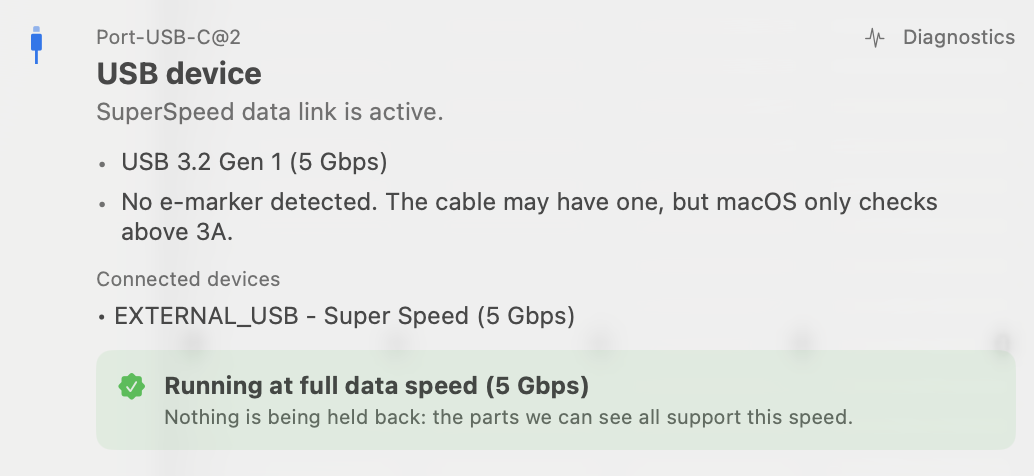
In reference to a recent article about USB-C Non-Power Delivery, we were pointed to https://www.whatcable.uk It is a small utility that has a nice UI to tell you about the cable and device you have plugged in. (It took us awhile to understand the output) With this you can see what the power and data rating is for the cable and device. If there is a mis-match you can find the optimal cable pair. After a bunch of tests, we realized that the only major data transfer we’re doing with connected devices is backups. Sure we plugin the phone and transfer some pictures over a lower connection, but switching cables is a savings of only seconds-to-minutes. If we use the faster cables that come with our external hard drives, and we do because they are the only devices that take the funky USB Micro-B connection.
The office is near the Downtown Reykjavik Airport. There is ALOT of overhead traffic. It’s gotten to the point where we can tell by the sound that this isn’t a “normal” plane. This shortcut for iOS is great! https://whatsoverhead.com You can just say “Hey Siri, what’s overhead” and it will read back some flight info. Since it is a shortcut you can see exactly how it is all working and salt-to-taste. It even works on a HomePod!