For the last few years, we’ve been using Apple Music for streaming. It’s great to have access to a gigantic catalog of songs, but it come with its downsides. Kevin Kelly is a big proponent of Access over Ownership. We tend to agree that access to transportation, access to healthcare, access to education and access to entertainment is cheaper and offers more options than trying to build or own it yourself.
The major downsides of ‘renting’ your music is that the current payout for artists is pretty bad and if you like something you need to pay for it. The current situation isn’t sustainable. The second issue is censorship/curation. Maybe your favorite track doesn’t exist on any streaming service, or it is a crazy DJ mashup or live recording? Thirdly, you are relying on streaming gatekeepers for your access – if for some EULA reason they decide to cut you off, you loose access to everything and then ownership becomes more important.
We used to have loads of CDs and MP3s that we listened too that aren’t on any streaming service. (We have BBC radio episodes converted from RealAudio Streams!) To enjoy our old music library we needed a new music player that could play songs locally not streamed. If you search for “Offline music player” on the App Store you get plenty of results. Some are free, some are ad driven, some have in app purchases, others cost to download. Some look good, some less so.
As a programmer, we decided to make our own Offline music player that suited our needs and looked and worked as we wanted. (Sure it probably would have been cheaper to pay for several apps than spend a single hour of our billable time on it, but then you’d never learn anything). Besides, the world already has enough love songs, but musicians keep writing them!
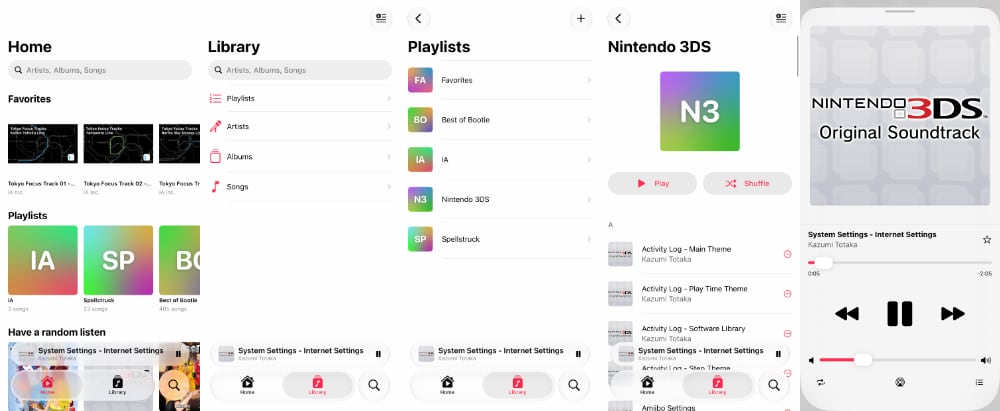
To build the offline music player, we first made all the dummy screens we wanted with placeholder content. Next, we started to wire-up the connections to import, save and extract mp3 metadata. That replaced our placeholder text with real text. Then we actually got the music to play. Rinse, wash, repeat.
We’re happy with the app and how it is performing. Occasionally we find edge-cases and fix those bugs.
We called the app “Rest” since it is both the opposite of “Play” and a pun on “the rest of your music collection”. The songs that aren’t on streaming.
Rest Music App is a free download for iOS, so if you find it useful or find any bugs, drop us a line.
Offline Mode
When you talk about having all your music downloaded outside of the streaming service you think about offline mode scenarios like long flights where Internet isn’t available.
While that’s true, we find that Rest isn’t our offline music app, since you can take streaming songs offline too, it really is the “rest” of our music library that’s not available on streaming. That is more valuable than just being available offline.
Next Steps
To get better feeling for what a Music app should have, we aped the built-in Music app from Apple as our template. Much like Hunter S. Thompson typing out a few pages of The Great Gatsby to get the feel and rhythm, we needed to know the workings of a Music app before we start to go all free-form Jazz. Now that we have the ‘table-stakes’ in our working we can make it unique.
The playback queue could use some love. When you toggle shuffle it does a good job of randomizing, but when you toggle it again it doesn’t really know how to go back to the original order.
The Album artwork is only used as a display in playback. We can be more creative with what we have. Also our Playlist names and defaults when no artwork is available is simple some random gradient meshes. We should allow you to edit them if needed.
These are all points we’ll address over time with more feedback, but we’re happy with the app and are using it on a frequent basis. Now that more people are aware of it, download it and use it, we’ll incorporate their feedback as well.